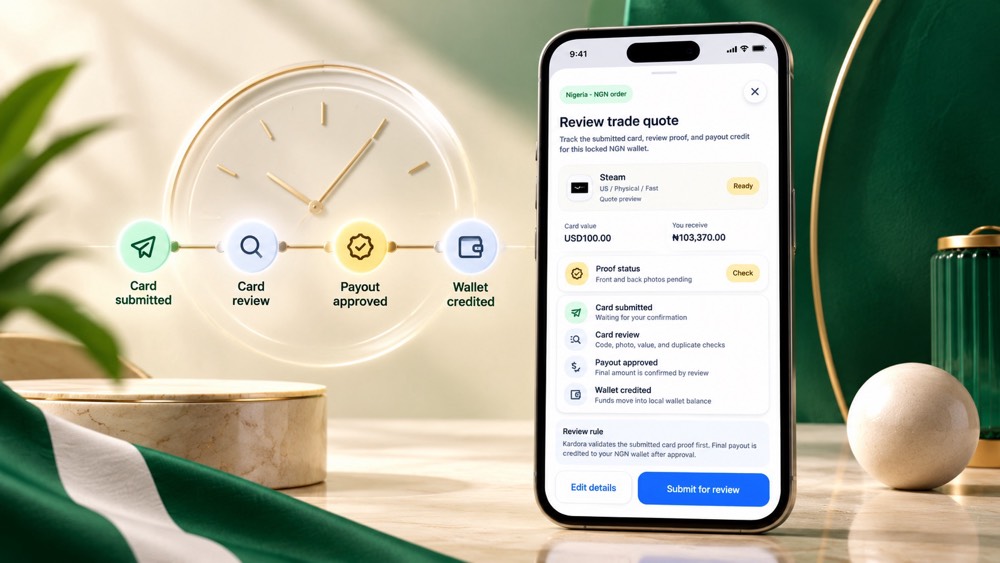
A gift card trade has several stages
There is no single completion time that applies to every gift card trade. Kardora first checks the card details and proof you submit. Timing can vary with the brand, card format, image quality, order volume and whether the review team needs more information.
The most useful way to understand timing is to follow the order stages rather than depend on a promise made before the card has been checked.
The four stages you will see
1. Card submitted
Your order begins after you confirm the brand, region, format, value and required proof, then submit through the official Kardora app. Review the summary carefully before this step. A wrong variant or face value can create avoidable delays.
2. Card review
Kardora checks the code, card value, images, supporting proof and duplicate-use signals. Physical cards may need clear front and back images. Digital cards may need a valid delivery record or other evidence shown in the app.
A quote shown before submission is an estimate. The final payout is confirmed only after the card passes review.
3. Payout approved
When review succeeds, the order status changes to show that the payout has been approved. If the submitted details do not match the selected card, the order may require another action or show a rejection reason instead.
4. Wallet credited
After approval, the confirmed amount moves to the NGN wallet connected to the Nigerian account. The order timeline and wallet record provide the clearest confirmation; do not rely only on a message or screenshot from outside the app.
What can make a trade take longer?
Common causes include:
- Blurry, dark, cropped or reflective card photos.
- A region, currency, card type or amount that does not match the submitted card.
- Missing receipt or delivery evidence when the review flow requests it.
- A code that has already been exposed, redeemed or submitted elsewhere.
- Higher review volume or a card that requires additional validation.
- A request for more information that has not yet been answered.
Submitting the same card repeatedly does not improve its position and can complicate review. Follow the instruction attached to the existing order instead.
How to reduce avoidable delays
Before you tap Submit for review, use this checklist:
- Confirm that the brand and exact variant are correct.
- Match the card's country and currency.
- Enter the face value shown on the card.
- Take sharp photos in even light, with all required edges visible.
- Keep original proof available if the app requests it.
- Read the quote and review rule on the confirmation screen.
- Make sure your Nigerian account and NGN wallet details are current.
These steps do not create a guaranteed completion time, but they help remove common causes of manual follow-up.
Where to check your order
Use the order record or transaction detail inside Kardora to follow the latest status. If the order asks for clarification, respond through the official path shown in the app. For a broader overview, read how to sell gift cards in Nigeria with Kardora.
If an order appears unchanged for longer than the guidance displayed in the app, open Kardora's official support route and provide the order reference. Do not share your password or one-time verification code. Learn more in how to avoid gift card trading scams in Nigeria.
The important takeaway
A fast-looking quote is not the same as an approved payout. Prepare accurate details, submit clear proof and watch the in-app timeline. The trade is complete when the card has passed review and the confirmed amount appears in your Kardora NGN wallet.